Payments
Payment processing for home service businesses
Customers pay from the quote or invoice link, or tap their card on your phone. The money goes into your own Stripe account, and Fixerlane takes nothing from a card payment.
14-day free trial, no card · listing and leads free forever
Why pros use it
No Fixerlane fee on cards
Card payments, Apple Pay and Google Pay included, cost you Stripe’s processing fee and nothing else. There is no Fixerlane percentage on top.
Your money, your account
Payments land in your own Stripe account on your own payout schedule. Fixerlane never holds the money, and your customers never pay a fee.
Paid on the spot or from the link
Customers pay deposits and invoices from the link you send, or you take the card on site, on your phone, with Tap to Pay.
How it works
Connect Stripe
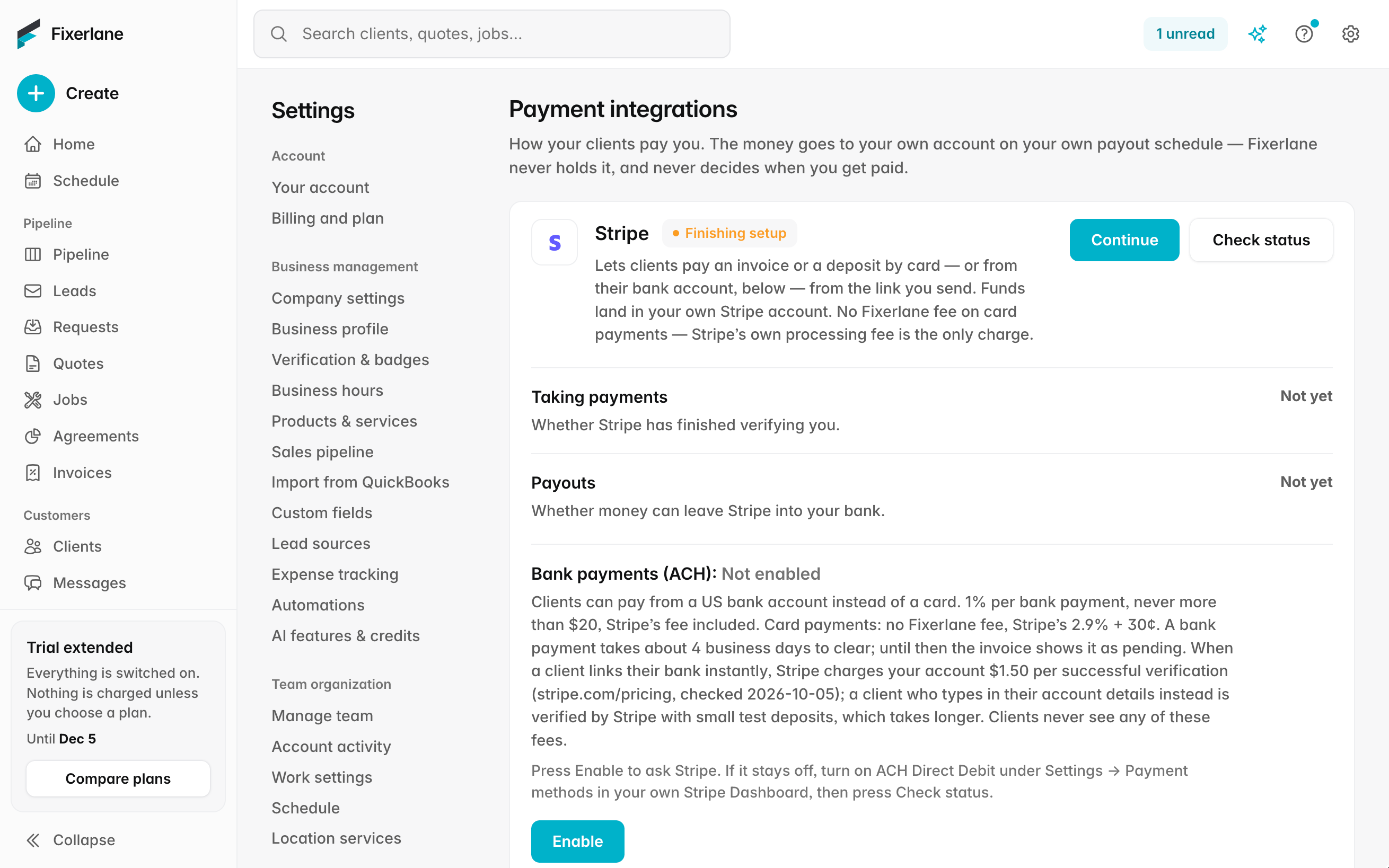
The owner opens Settings → Payment integrations → "Set up payments" and enters business and bank details with Stripe. "Check status" shows when taking payments and payouts are ready.
Choose what you offer
Switch bank payments on or off with "Offer bank payments", and tips with "Let customers add a tip".
Get paid from the link
Quotes and invoices carry a payment link. The customer pays a deposit or the balance by card or bank, and the payment is recorded on the invoice.
Or take it on site
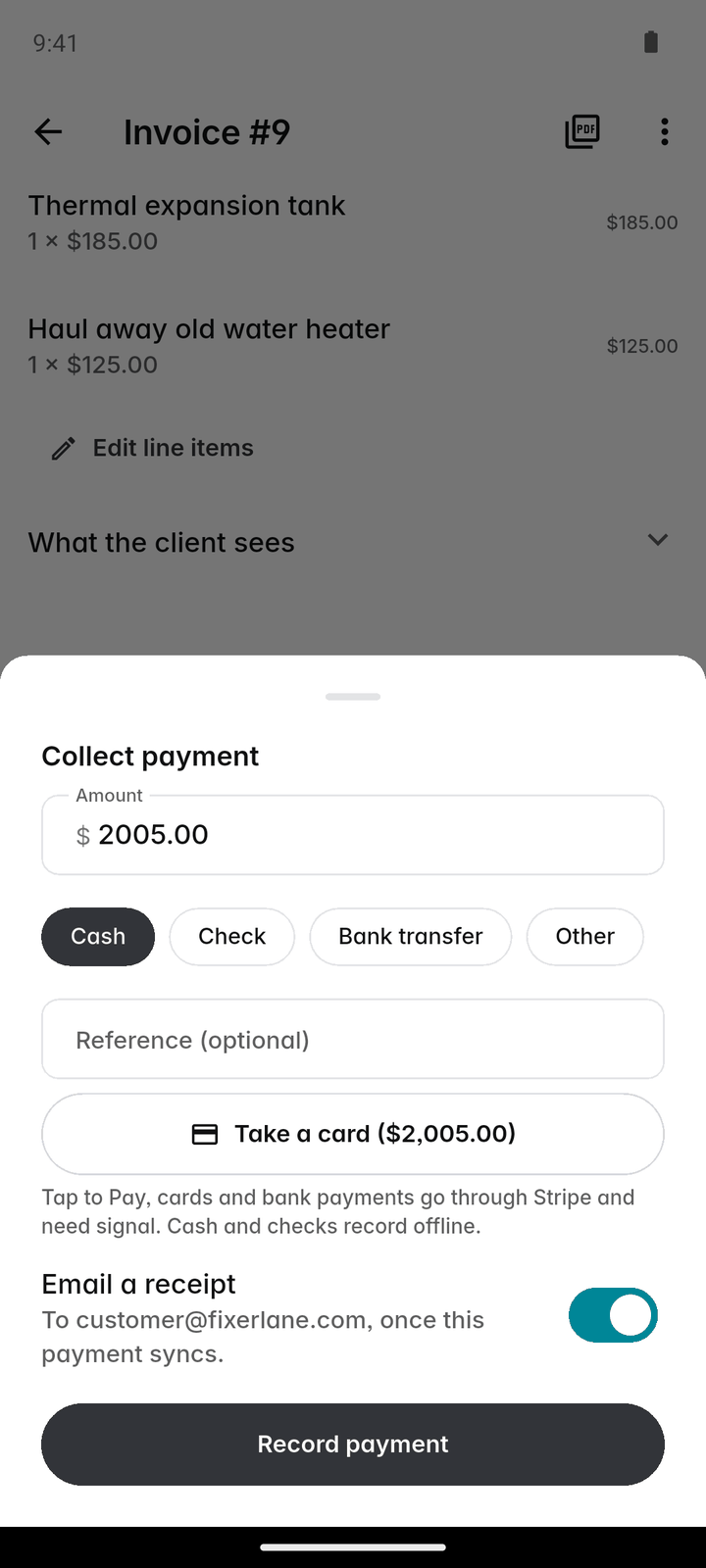
Open the invoice and tap "Collect payment": tap a contactless card on your phone, take a bank payment, or record cash, cheque or transfer.
Watch it land
The invoice shows each payment and what is left. A receipt is emailed to the customer, and the money reaches your bank on your Stripe payout schedule.
In more detail
What it costs, exactly
Cards: no Fixerlane fee. You pay Stripe’s own fee, 2.9% + 30¢ per successful US domestic card payment on Stripe’s published pricing. Bank payments (ACH): 1% of the amount, never more than $20, with Stripe’s ACH fee included, so $500 costs $5 and $2,000 or more costs $20. The smallest bank payment is $1, and bank payments take about 4 business days to clear; they show as pending until they do. On a refund, Fixerlane’s part of a bank-payment fee is returned in proportion.
Deposits, part payments and saved cards
Ask for a deposit on a quote, as a set amount or a share of the total; it comes off the first invoice automatically. Customers can pay part of an invoice’s balance online, and you can record part payments by hand. A customer can also save a card and authorise you to charge it later, which is how service agreements bill a card each month, quarter or year. The card is held by Stripe, never by Fixerlane.
Tap to Pay and instant payouts
Tap to Pay takes a contactless card, or a phone or watch wallet, on a supported iPhone or Android phone through Stripe Terminal, with no card reader to buy. Payouts follow your Stripe schedule; when you need the money sooner, ask Stripe to send a payout to your debit card within minutes, for Stripe’s instant payout fee. Office and crew members need "Can collect payments" turned on to take payment on site.
Tips, refunds, disputes and receipts
With tips on, customers can add 10, 15 or 20% or their own amount when paying online; the tip is yours and recorded apart from the invoice. Owners and admins can refund a card or bank payment, in full or in part, and the customer is emailed. You are the merchant, so disputes come to your Stripe account and are answered there. A refund comes out of the invoice money first and the tip last, and once Stripe has made a refund it cannot be undone; cash and cheques are given back by hand. A receipt is emailed for every payment while "Payment receipt" is on, which it is by default.
What it costs
Cards: no Fixerlane fee, only Stripe’s processing fee. Bank payments (ACH): 1% per payment, never more than $20, Stripe’s fee included. Taking payments is part of every plan, from $19.99 a month after a 14-day free trial with no card needed.
See all plans →Not built yet
Listed here rather than discovered after you sign up:
- Consumer financing or buy now, pay later for customers
- Payment processors other than Stripe
Common questions
- Does Fixerlane take a cut of card payments?
- No. On card payments, including Apple Pay and Google Pay, the only fee is Stripe’s processing fee, paid from your Stripe account. Fixerlane adds nothing.
- Why is there a fee on bank payments?
- Bank payments (ACH) cost 1% per payment, never more than $20, and that includes Stripe’s own ACH fee. On a large invoice it is usually cheaper than a card.
- Do my customers pay a fee?
- No. Customers pay the amount on the invoice or deposit, plus any tip they choose to add.
- Where does the money go?
- Into your own Stripe account, then to your bank on your Stripe payout schedule. Fixerlane never holds it. Payouts, statements and your bank details are managed in Stripe.
- Do I need a card reader?
- No. Tap to Pay takes contactless cards on a supported iPhone or Android phone. You can also take a card on the phone by typing it in, or send the payment link.
- Can I take payments offline?
- Cash and cheques can be recorded with no signal and sync later. Card and bank payments need signal at the time.
- Who handles a chargeback?
- You are the merchant, so disputes and chargebacks come to your Stripe account and are answered in the Stripe Dashboard. Bank payment disputes are final.
- Can I charge a customer’s card each month?
- Yes, with a service agreement. The customer approves it and saves a card, authorising the charges, and each period the card is charged. If a charge fails, the invoice stays open and you are told.
Works well with
Invoicing
Raise the invoice from the job you just finished, send it with a payment link, and see what is still owed without opening a spreadsheet.
Service agreements
Set the visits once and Fixerlane keeps booking them. Set the price once and it bills the client every month, quarter or year, by emailed invoice or their saved card.
Quoting
Build the quote on site, send it before you leave the driveway, and know the moment the customer opens it, approves it or asks for a change.
Mobile app
Everything the web console does is in the app, and the app keeps working in basements, crawl spaces and dead zones. Changes wait on the phone and send themselves when signal comes back.
The same tools in the Fixerlane app
Fixerlane runs in the browser and on Android and iPhone, with the same tools in each. The app keeps your day on the phone, so it keeps working without signal.


Try it on your own work
Start the 14-day trial with no card, or claim your free listing first and add the tools later.
All features →